Turn scattered notes into a connected second brain.

Zenodot brings AI-powered note taking to iPhone. Capture ideas as they come, let the Librarian organize them into connected Pages, and ask questions about what you have saved.

Download on the App Store

Android, web, and desktop are coming soon.

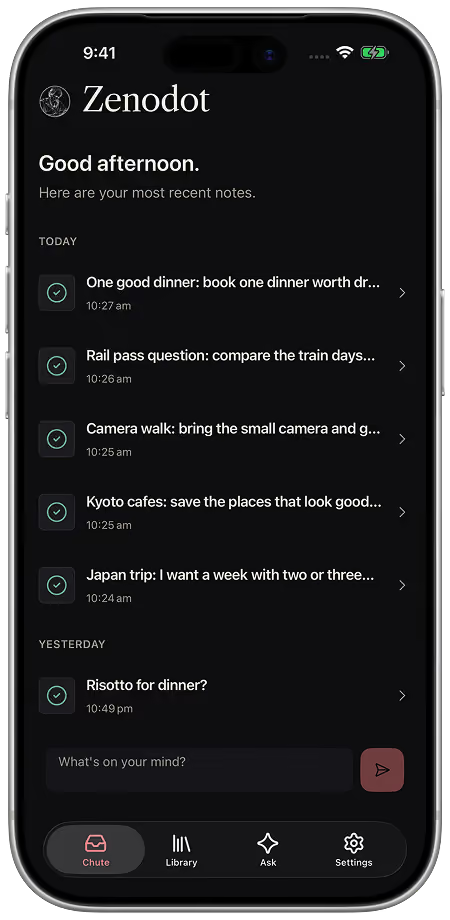
Zenodot's Notes screen showing recently captured notes in an iPhone frame
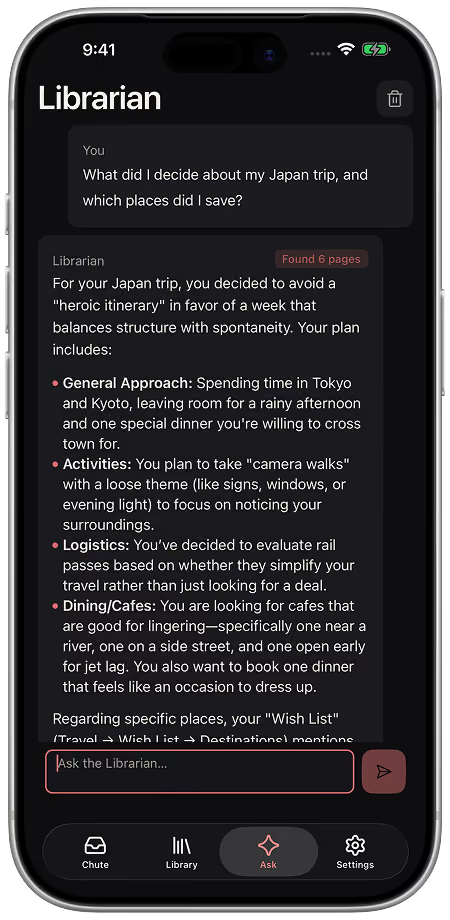
The Librarian working with a saved travel note in Chat
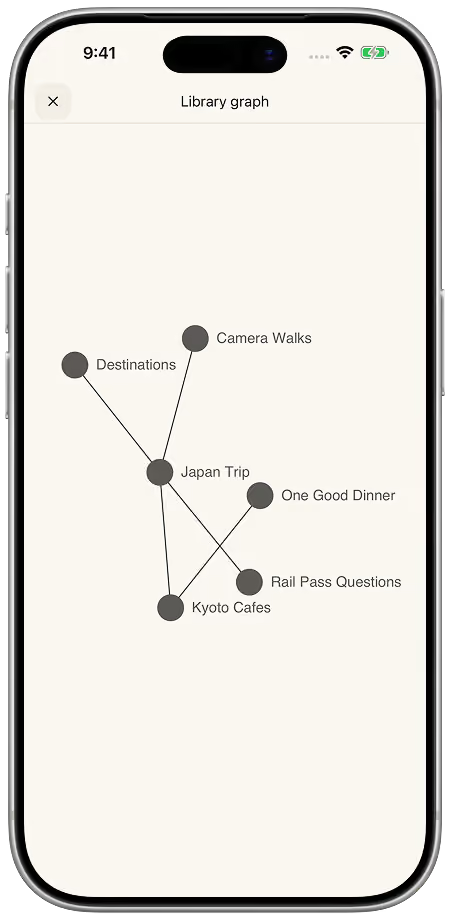
Zenodot's Library graph connecting related travel notes in an iPhone frame

Features

A personal knowledge base for ideas, research, and everything worth remembering.

Capture freely, let Zenodot organize the rough edges, then return to your own connected notes when you need an answer.

Capture without filing.

Write down or dictate an idea, research note, or reminder. Zenodot's Librarian handles the first pass so you can keep thinking.

A new thought being captured in Zenodot

Organize scattered notes automatically.

Your notes become clean, connected knowledge across Folders and Pages.

Knowledge automatically arranged into a Zenodot library

Chat with the Librarian.

Chat in plain English to find answers and work with your saved notes.

The Librarian finding answers and working with saved notes in Chat

New to the idea? Read our guide to what a second brain is and how to start one.

Let one idea lead to another.

Zenodot links related pages and knowledge together.

A Cafes to Try page linking to a related Seven Seeds note
The linked Seven Seeds page in Zenodot

See the shape of your knowledge.

Explore how every idea connects.

Zenodot's Library graph showing connected pages around a Japan Trip note

Your notes, wherever you are.

Sign in with a linked account to sync your Library across devices.

The same Zenodot Notes screen in dark mode
The same Zenodot Notes screen in light mode

Pricing

Go further with your second brain

Start with the essentials for free, or unlock more room for your growing knowledge library with Pro.

Billing period

Free

Start with the essentials for free, then upgrade when you need more room.

$0forever
Get started free

Available through the Zenodot app

Included with Free:

  • Capture and organize notes with AI
  • Chat with the Librarian about your personal library
  • Cross-device sync with a linked account
  • Standard AI usage limits
  • Standard library capacity
  • 24-hour page history

Pro

More room and capability for your growing knowledge library.

US$79.99/ year

Equivalent to US$6.67/monthbilled annually

Get Pro plan

Available through the Zenodot app

Everything in Free, plus:

  • Higher library capacity
  • Higher AI usage limits
  • On-device dictation
  • 90-day page history

Prices are shown in US dollars. Your local App Store price may differ.

Download

Your library awaits

Zenodot for iOS is available on the App Store.

Download on the App Store

Android, web, and desktop are coming soon.

FAQ

Questions, answered.

How can I get Zenodot now?

Zenodot is officially available for iOS on the App Store. Android, web, and desktop versions are coming soon.

What languages does Zenodot support?

Zenodot currently supports English, Chinese, Spanish, and German, with more languages on the way.

Is Zenodot an Obsidian alternative?

Zenodot is a simpler alternative to Obsidian if you want a second brain without maintaining a vault of local Markdown files. Obsidian offers files, backlinks, and plugins you configure yourself; Zenodot organises your notes with AI and lets you chat with the Librarian about your library from day one.

Is Zenodot like OpenClaw?

Not quite. OpenClaw is a self-hosted personal AI assistant you install and run yourself, while Zenodot is a polished iOS app for capturing notes, organising them into a connected library, and chatting with the Librarian. If you want a second brain without managing infrastructure, Zenodot is the lower-friction choice.

Read the product FAQ